

AI assistant & analytics
A built-in "Ask AI" chat panel for your readers, and a full conversation-analytics dashboard behind it — Top Questions, Coverage Gaps, intent tags, search, digests, and more.
Aardvark ships a native “Ask AI” assistant for your readers, and behind it a full conversation-analytics dashboard that turns every question into product insight. It is a first-party feature — the assistant calls the Aardvark cloud gateway, which proxies the model, meters the spend, and records the conversation for analysis. There is no third-party widget to embed and no separate vendor to sign up with.
This page has two halves: the reader’s assistant (what visitors see) and the analytics dashboard (what you see). The cloud gateway page covers the billing, metering, and Stripe setup that sit underneath both.
The reader chat and every analytics model pass (clustering, per-turn analysis, the natural-language analytics assistant) are metered to your gateway account at the gateway’s rate. You pay to analyze your own conversations; a depleted account simply pauses analysis rather than breaking. See How it’s billed.
The reader’s assistant
A floating “Ask AI” panel sits on every page. Readers ask a question in natural language; the
assistant answers from your content, citing the pages it used, and they can rate each answer with
👍 / 👎. When local retrieval is on, opening Ask AI reads its config and then loads your dedicated
agent-audience corpus when the advertised decoded size is at most 8 MiB; the streamed transfer and
decompressed output are capped too. Readers who never open it do not download or prepare the corpus,
and search.compress controls whether a pre-compressed copy is available. An oversized corpus keeps
the page-by-page path when its compact agent index fits that artifact’s separate 8 MiB browser cap;
an oversized version-scoped compact index fails closed instead of crossing versions. It ranks locally
and normally sends a small set of complete, structure-preserving Markdown pages in one model request.
Broad or ambiguous questions keep page-fetching available, using a compact navigation view derived
locally when possible; complete pages are then read from the loaded browser corpus without another
HTTP request. Even when the entire corpus fits a model’s advertised context window, repeatedly
transferring and processing it would add avoidable first-token latency. It also
accepts file attachments (images, PDFs, text/code)
when you leave them on.
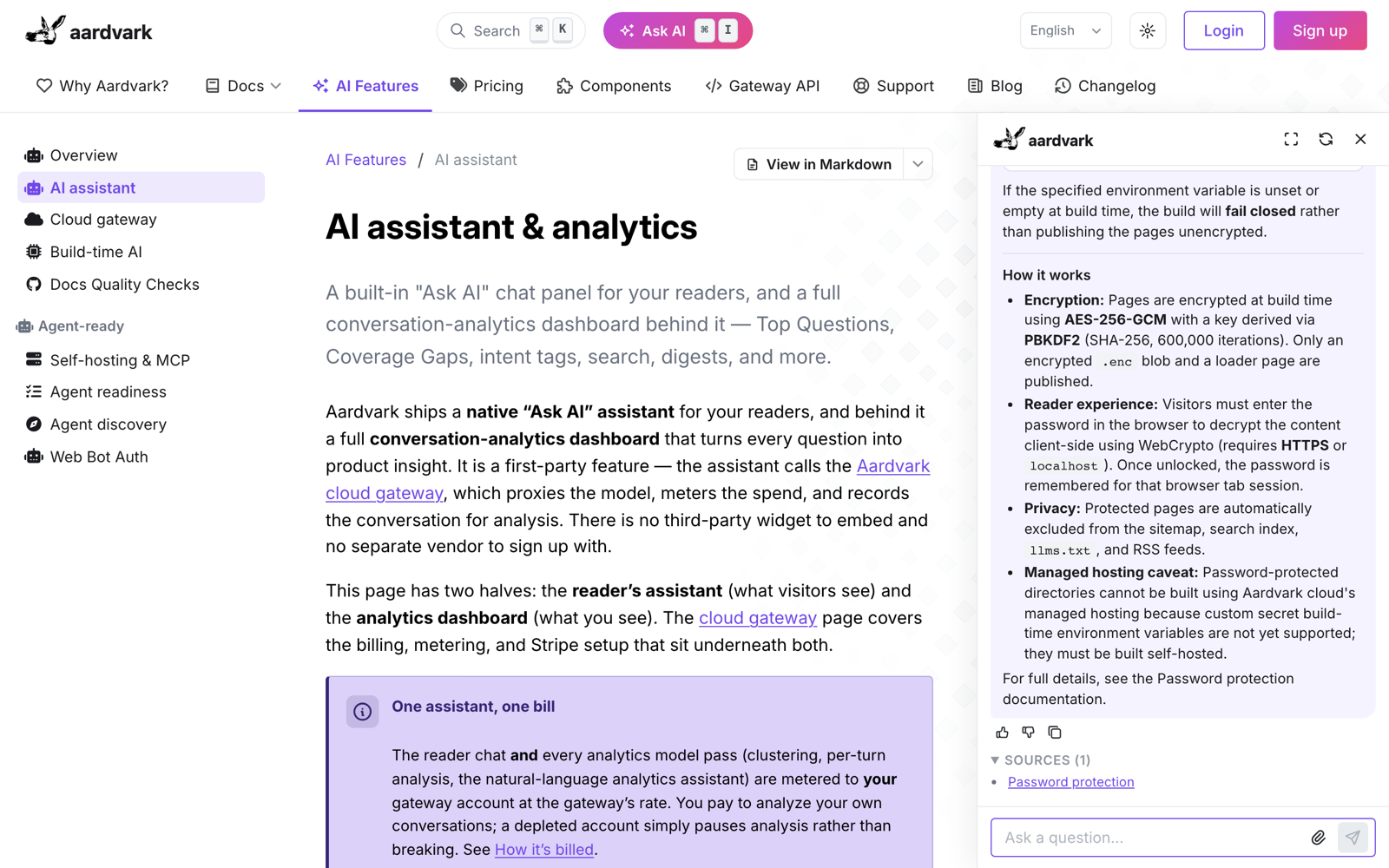
Readers reach it three ways: the Ask AI button in the site header, the question field pinned to the bottom of every page, and the Cmd/Ctrl + I keyboard shortcut. Answers stream in as they are written — including the model’s thinking, when you run a reasoning model — and fenced code in a finished answer is syntax-highlighted in your own theme palette.
Enable it
ai:
  assistant:
    enabled: true
    model: "~anthropic/claude-sonnet-latest"   # any model the gateway proxies; "latest" alias needs the leading ~
    escalationEmail: support@example.com       # optional: offer a human under a down-voted answer
The site also needs your public gateway key baked in as the AARDVARK_KEY environment variable at
build time. Provisioning a key and funding the account live on the cloud gateway page.
AARDVARK_KEY must be your public aardvark_live_… key: it is written verbatim into
/_aardvark/ai-config.json and served to every reader. Setting a secret aardvark_secret_… key there
fails the build rather than publishing it, because a secret key can manage the account and bypasses
the gateway’s reader guardrails. With no key at all, the panel renders a “not configured” notice
instead of answering; any other value does the same, and the build warns and doesn’t bake it.
Options
All optional except enabled:
| Key | Default | What it does |
|---|---|---|
enabled |
false |
Master switch for the reader panel. |
model |
~anthropic/claude-sonnet-latest |
The model the assistant answers with (must be vision/file-capable if you keep attachments on). |
reasoning |
model default | Reasoning control for a reasoning-capable model — enabled (bool) and effort (low/medium/high). |
attachments |
on | Reader file uploads — 4 files of 10 MB each by default. See Reader attachments for the caps and cost notes. |
store_history |
true |
Posts each finished turn to the gateway so it appears in your dashboard and feeds the analytics below. |
inlineContextMaxTokens |
model-derived (local page maximum 24k) | Approximate combined pre-request target for the current question/preamble, attachments, selected documentation or fallback index, and replay history. Text uses a conservative UTF-8 bytes/3 estimate (about 3 ASCII characters/token). Current user content is not truncated and same-turn tool results may grow beyond it. 0 disables direct page inlining and omits the complete corpus on every site; a public-key versioned site retains scoped navigation only when its compact agent index fits that artifact’s separate 8 MiB browser cap. |
inlineContextWindowFraction |
0.6 |
How much of the model’s real context window that derived budget may fill. |
escalationEmail |
unset | Address behind the “Email us” offer shown under a down-voted answer — and the signal the deflection metric is measured from. |
topAskButton |
true |
The Ask AI button in the site header. |
bottomTextField |
true |
The question field pinned to the bottom of every page. |
app |
on | The installable “{site} Assistant” app — see Install it as an app. |
prompt |
server-side | The system prompt is not baked into the public site — set it as the key’s system_prompt when you mint the key. Setting it here warns and is ignored. |
maxFiles and maxFileSizeMb are the picker’s own limits, enforced in the reader’s browser. The
gateway applies its own, separately: it refuses a turn carrying more than 20 attachment parts, or
more than 48 MiB of encoded attachment payload in total. maxFiles is not clamped to that ceiling,
so a site that sets it above 20 lets readers attach files the gateway then rejects at send time — keep
it at 20 or below.
If the build cannot resolve a custom model through OpenRouter’s catalog or its built-in table, it
uses a conservative 16k combined-input budget. Set inlineContextMaxTokens explicitly when the
model’s window is smaller.
The build serializes the complete corpus before publishing it. Above 8 MiB it warns, neither writes
nor advertises the complete corpus, and retains compact/agentic retrieval. When the corpus is emitted,
assistantCorpusBytes and assistantCorpusSha256 are generated into
/_aardvark/ai-config.json; they are not author settings. They record the exact plain-corpus size and
SHA-256 for the browser’s bounded load and generation-match validation. If either declaration is
absent or invalid, the browser does not trust the complete corpus and retains the same fallback.
The version-scoped compact fallback carries every page’s flattened search text, so it has its own
8 MiB decoded limit rather than trusting a generated size as the limit. The build advertises its exact
size and SHA-256 as assistantNavigationBytes and assistantNavigationSha256 only when it fits. Above
that limit an assistant-only artifact is omitted; an independently needed Search/MCP copy may remain
deployed, but the assistant does not request it and fails closed if the complete corpus is unavailable.
The entire analytics dashboard is built from stored transcripts. Leaving store_history on (the
default) is what populates Insights, Conversations, Top Questions, and the rest. Set it to false and
the assistant still works — questions still travel to the gateway to be answered — but no transcript is
posted or stored, so the dashboard has nothing to analyze.
Install it as an app
Turning the assistant on also publishes a reserved /_assistant/ page — the assistant alone, permanently
fullscreen, with no way to close it — plus a web manifest and app icons rasterized from your favicon, so
readers can install your assistant as a standalone app on desktop and mobile. Launching the installed
app opens straight into that fullscreen chat.
Readers install it three ways: the browser’s own install offer (which appears on any page of the site),
an Install app button in the panel’s empty state, and the Install Assistant entry in the page-actions
menu. The installed app’s scope is /_assistant/ alone — it is the assistant, not a copy of your docs —
and there is no service worker, so it never serves stale content. The page itself carries noindex and
stays out of your nav, sitemap, search index and llms.txt.
Name the app with app.name (default “{site name} Assistant”) and app.shortName, set the icon backdrop
with app.iconBackground, or drop the page, manifest, icons and install affordances entirely with
app.enabled: false.
The analytics dashboard
Every stored conversation feeds an analytics suite on the gateway dashboard — open
gateway.aardvarkdocs.com/dashboard and sign in with the magic link
emailed to you, or through single sign-on where your account has it configured. (The dashboard is a
browser session; the aardvark_secret_… key is the API/CLI credential, and it authenticates the
programmatic endpoints below.) Cron passes on the gateway classify each answer,
cluster the corpus into themes, and surface where your docs fall short.
The analysis pass classifies an answer from the model’s own chain-of-thought, so it only grades turns
whose reasoning trace was captured. Run the assistant on a model that emits reasoning (or leave
reasoning.enabled: true on one that can) — otherwise conversations still appear in the dashboard, but
answer quality, uncertainty and Coverage Gaps stay empty.
Insights — the overview
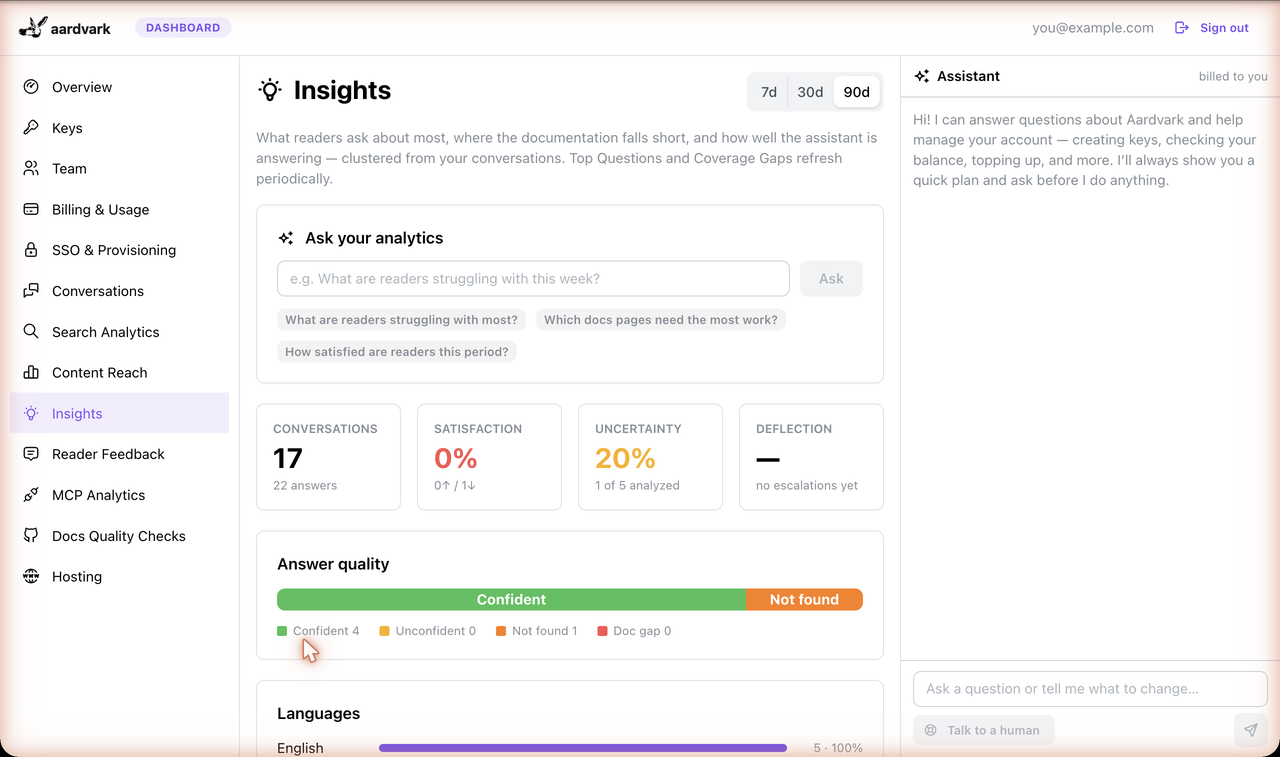
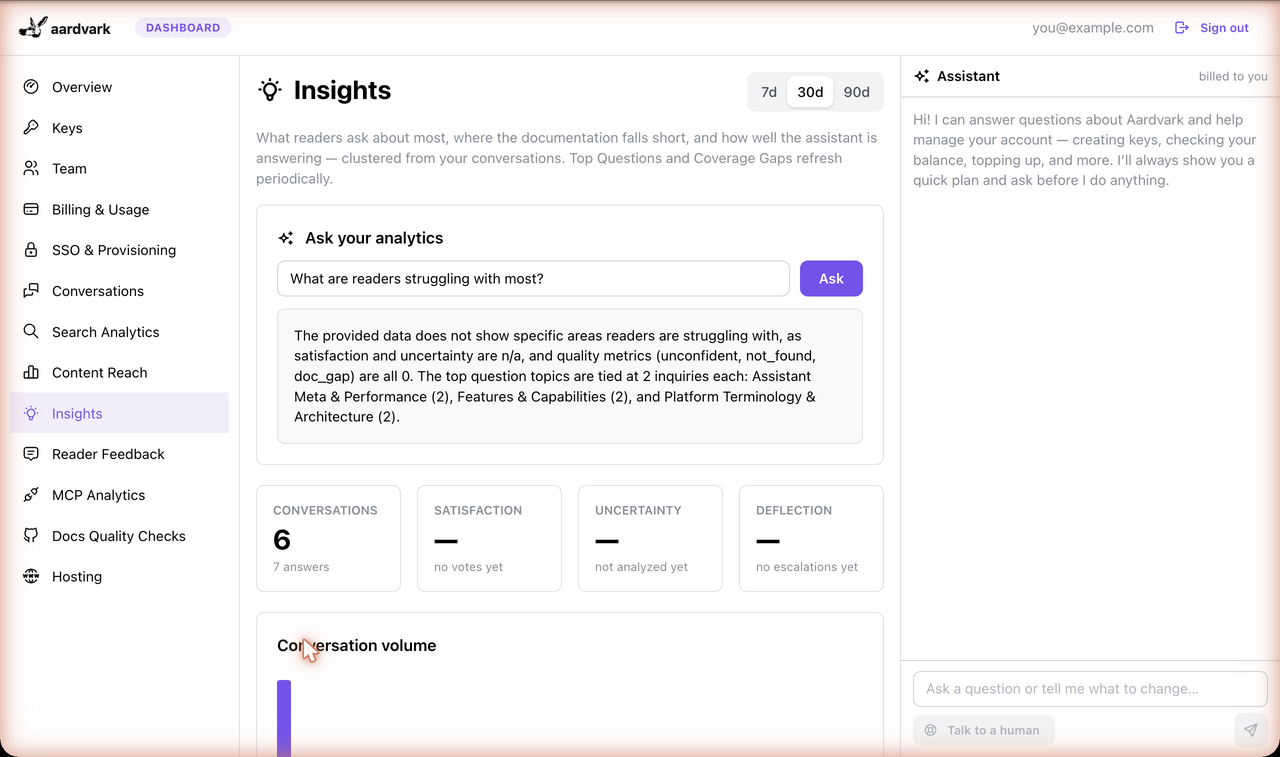
The Insights tab is a KPI overview over a 7 / 30 / 90-day window (30 by default): total
conversations and answers, the reader satisfaction rate (the 👍 share of votes), the
uncertainty rate (the share of graded answers that were anything but confident), an
answer-quality distribution bar (every graded answer is confident / unconfident / not_found
/ doc_gap), a conversation-volume series, the language mix, and a support-deflection
rate. Deflection is measured from the escalation offer, so it stays blank until you set
escalationEmail.
The window applies to those live metrics. Top Questions and Coverage Gaps below are period snapshots and don’t move with it.
Top Questions
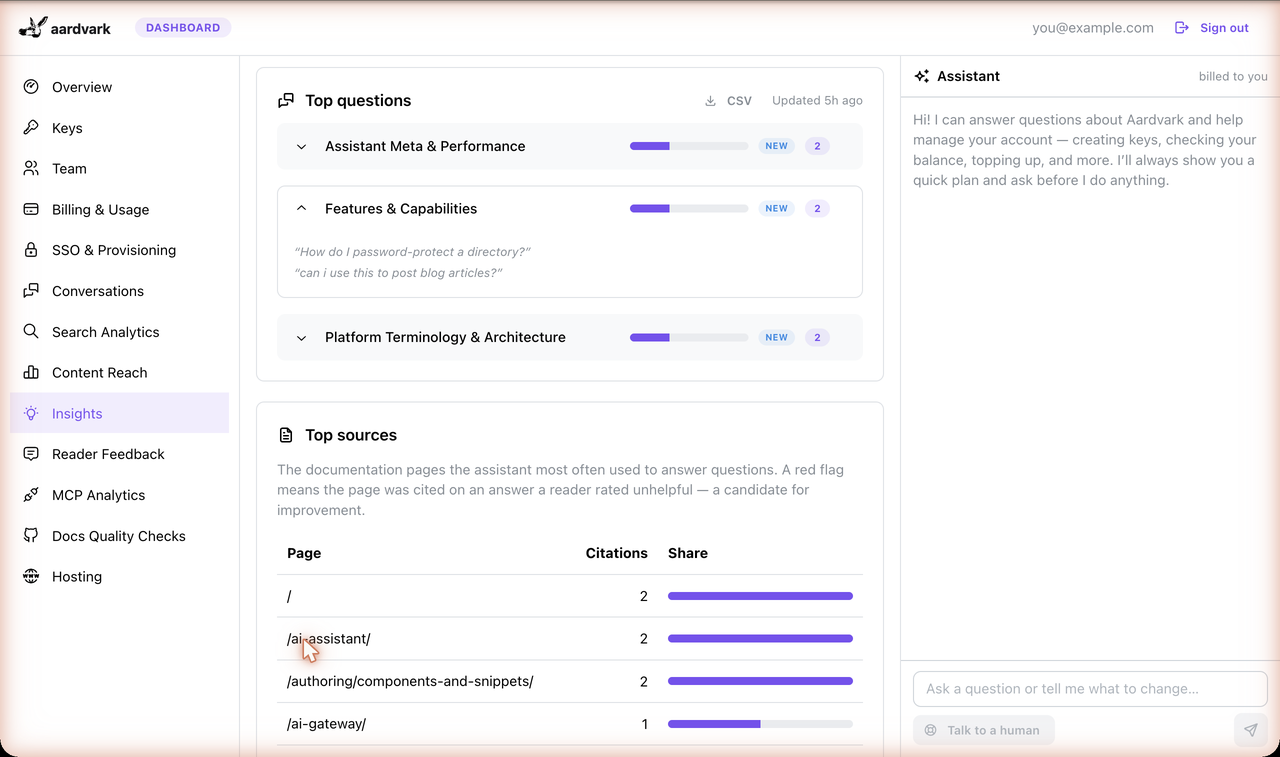
A cron pass clusters recent conversations into broad themes — each a label, an approximate conversation count, example questions, and a trend chip versus the prior period. Use it to see what readers actually come for, and export the list to CSV.
Coverage Gaps
The companion pass clusters the uncertain answers — the questions your docs handle poorly — into recurring topics. Each gap card carries a Finding (what’s missing or confusing) and a concrete Recommendation. A Copy for LLM button drops the finding + recommendation onto your clipboard, you can set a triage status (open / in progress / done / dismissed), and you can copy the gap as a ready-to-paste issue — GitHub and Linear in Markdown, Jira in wiki markup. The status is keyed to a stable label hash, so it survives the next re-cluster, and any teammate can triage (unlike tags and the digest, which are the owner’s to set).
Both clusters come from a periodic pass over one calendar period’s conversations, capped at ten themes per kind. It needs a handful of recent questions before it will group anything (and a few flagged answers before a gap appears), and it re-clusters an account at most once every few hours — so a brand-new site sees “not enough conversations yet” for a while, and a fresh answer shows up in Conversations long before it moves a theme.
Conversations
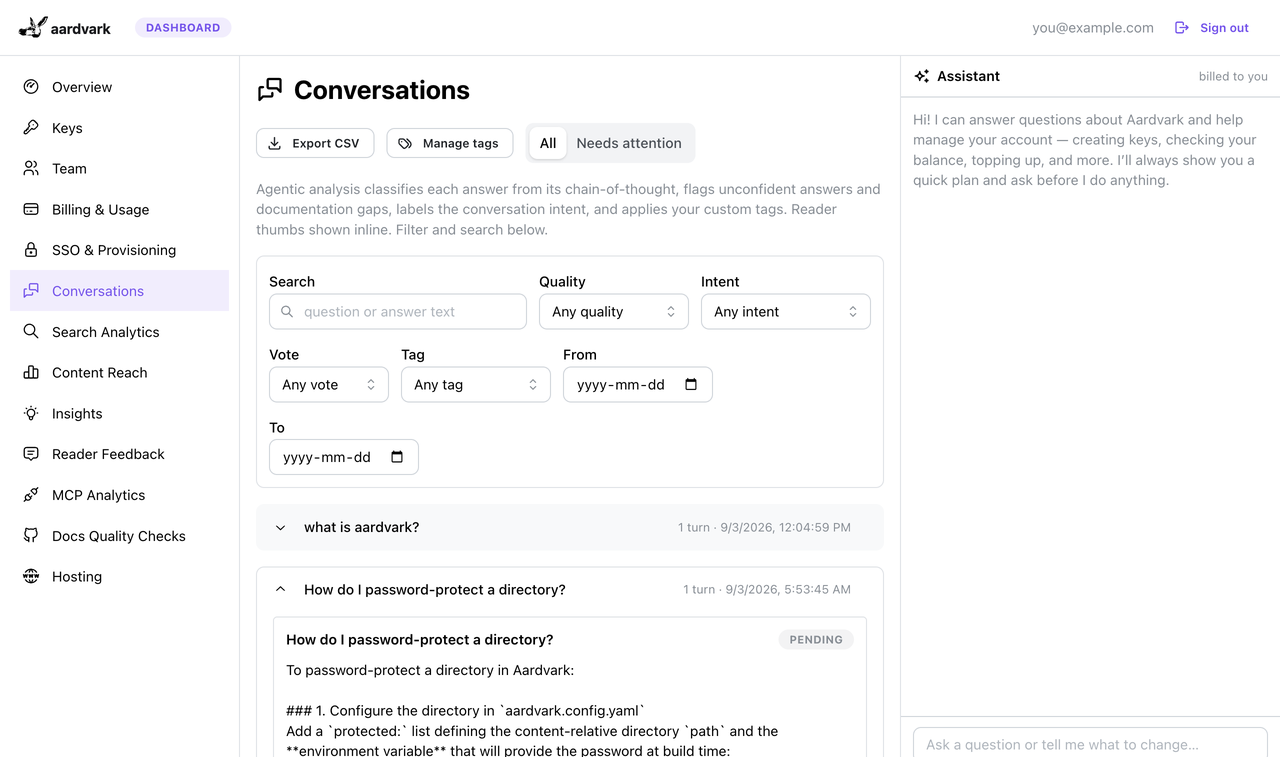
The Conversations tab is the raw record: every conversation with its per-turn verdict, an intent auto-label (troubleshooting, product discovery, unsupported feature, competitor, off-topic), a sentiment reading, and any custom tags you’ve defined. A rich filter bar narrows by full-text search, verdict, vote, intent, tag, and date range, and a needs-attention view surfaces the flagged answers worth reading. Open any conversation for the full transcript, and export the filtered set to CSV (formula-injection-guarded, up to 5,000 turns per export).
Custom tags are your own vocabulary: give a tag a name and a description of when it applies, and the analysis pass applies it. An account can hold 20 tags (the account owner defines them), a tag name can’t contain a semicolon — the CSV export joins a turn’s tags with one — and each conversation carries at most eight. Tags apply to conversations the pass analyzes after you create them; existing conversations are not re-analyzed, so define a tag before the traffic you want it on.
Source Analytics
Which of your pages are doing the work: the most-cited sources in the selected window (top 20), plus the citations that show up disproportionately alongside down-voted answers — a signal that a popular page may be misleading rather than helpful.
Periods, trends & the email digest
Snapshots are versioned by period — the gateway clusters by week, month or quarter — so you can navigate back through history and every cluster shows a trend against the prior period. Opt in to a weekly or monthly email digest (from the dashboard; the account owner sets it) and the gateway emails the owner a summary of the latest Top Questions, new Coverage Gaps, and headline metrics. A period with nothing clustered is skipped rather than mailed empty.
Ask your analytics
A natural-language panel answers questions about your own Insights data — “what are readers most confused about this month?”, “which pages get cited with thumbs-down?” — so you don’t have to read every chart. It reads the last 30 days of aggregates and the latest clusters — never raw transcripts — takes a short question, and is rate-limited per account; like the clustering passes it’s metered, and it says so plainly when the balance is out.
That 30-day window is fixed. The 7d / 30d / 90d selector at the top of the page re-scopes the KPI cards and charts, but the question you ask here is always answered from the last 30 days — so on the 7d or 90d view the answer can quote different numbers than the cards right above it.
Programmatic export
For pulling analytics into your own pipelines, two read APIs that take either your dashboard session or your secret key:
GET /v1/activity— aggregate stats (conversations, answers, satisfaction, verdict distribution, deflection, languages) over a?days=window: 30 by default, up to a year.GET /v1/threads— a keyset-paginated full-conversation export, oldest first, 200 turns per page (up to 1,000). Pass?since=an epoch-ms timestamp for a fresh pull or the previous page’snext_cursorto continue — either way each turn is returned exactly once, so a follow-up sync returns only what’s new.
How it’s billed
The reader assistant uses your configured model (a capable chat model by default). The analytics
passes deliberately default to a cheap, large-context model (~google/gemini-flash-latest) so
classifying and clustering a corpus stays inexpensive; an operator can override each pass
independently. Every call — reader chat and analytics alike — rides the gateway’s managed upstream key
and is metered to your account at the published rate. Spend can’t run away: each pass is bounded
per cron tick and per account, an answer the model can’t classify is retried only a couple of times,
and an account with no balance is skipped until it’s funded again. Full pricing, funding, and Stripe
details are on the cloud gateway page.
Privacy
The analytics are deliberately leaner on identity than third-party tools: there is no durable per-visitor id, so the dashboard reports active conversations, never a “unique users” count. Stored transcripts keep the question, the answer, and the model’s reasoning for that answer — the reasoning is what the grading reads — plus the pages the answer cited. Attachment bytes are never stored. Transcripts age out on the gateway’s retention schedule (90 days by default), and everything derived from them — verdicts, tags, cited-source events — is pruned with them.
The panel shows readers no “this chat is stored” notice of its own, so if your policy requires
disclosing that reader questions are retained, say so in your privacy policy or near the assistant —
or turn store_history off, which stops transcripts being posted or stored. It does not stop questions
reaching the gateway: they still travel there, with any attachments and the pages the assistant
retrieved, to be answered at all. The 👍/👎 feedback and engagement beacons keep reaching it too.
Related
- Cloud gateway — the metering proxy behind the assistant: prepaid balances, Stripe card-on-file, auto-top-up, and reader attachments.
- Build-time AI — opt-in features that run during the build (frontmatter, example API responses, skills), also via OpenRouter.
- Self-hosting & MCP — running a built site, and serving it over MCP.